APS105 L01-03
#APS105Link to chapter Link to web notes
1.1 The Basic Structure of Computers
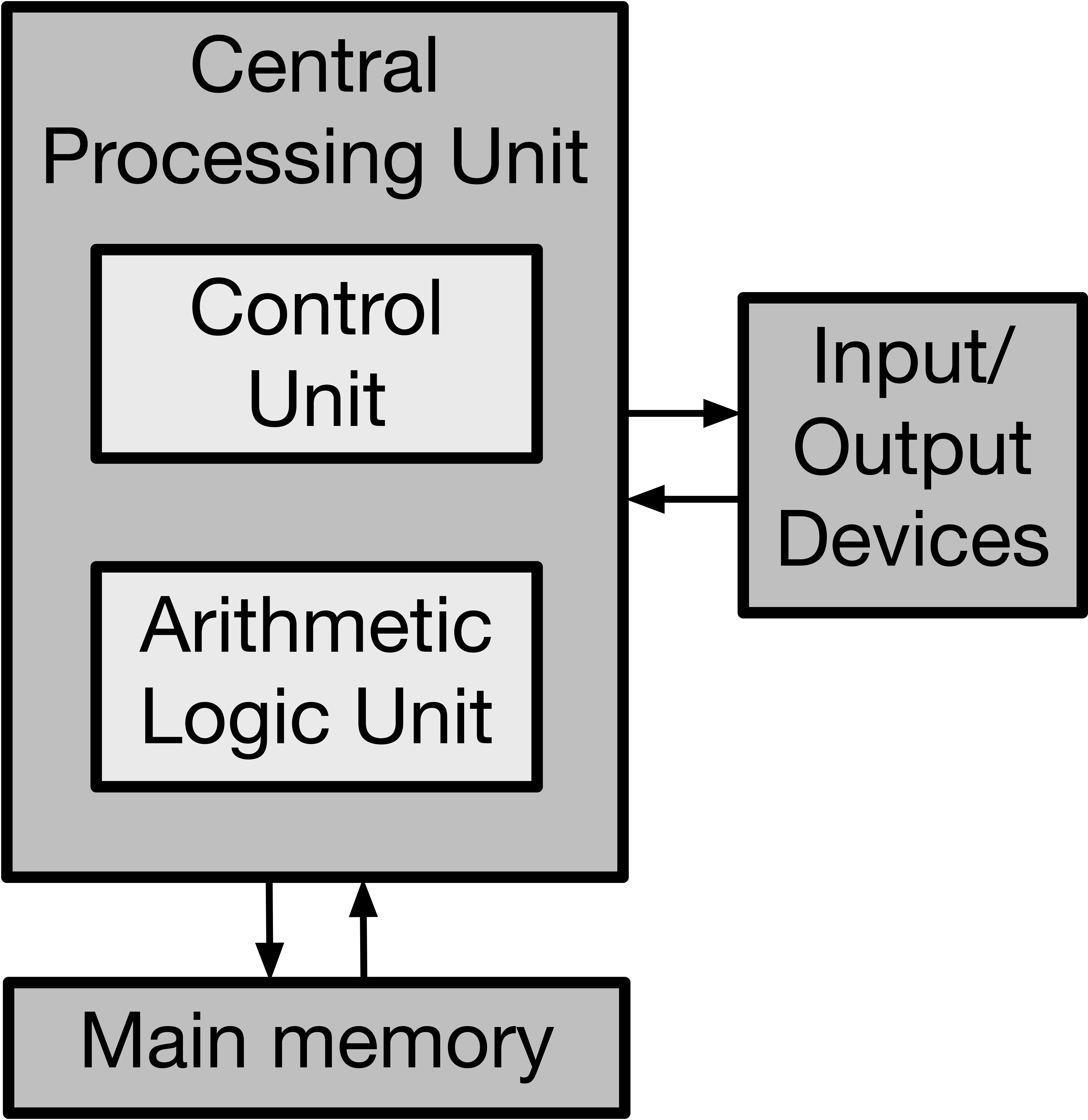
The main components of a computer (that are relevant to the course, anyway) are:
- Central Processing Unit (CPU)
- Arithmetic Processing Unit (ALU)
Performs arithmetic and logical operations, such as addition, subtraction, comparisons, etc. - Control Unit
Controls the execution of instructions.
- Arithmetic Processing Unit (ALU)
- Input/output (I/O)
Takes in some stimulus from the outside world (input) and sends something out to the outside world (output). E.g. keyboard/mouse and monitor. - Main Memory
Stores all data and instructions on the program we want to execute in binary.
1.2 Binary Representation in Memory
Data is stored in memory in binary, i.e. 1s and 0s.
- A bit is either a
0or1. - Referring to the "one's bit" and "two's bit" is analogous to the one's digit and ten's digit in base 10.
- In most programming languages, the binary is preceded by a
0bprefix, e.g. 5 is the same as0b101.
Converting from decimal to binary
Decimal is any integer represented in base 10, e.g. 123.
- Decimal -> binary:
- Divide decimal number by 2; remainder is the binary digit.
- Repeat using the result number if remainder is 0, or the next smallest integer, until you reach 1. Append each remainder to the previous remainder, from right to left.
- Once you reach 1, append 1 to the leftmost end.
- If the length of the binary number is less than the address size, then the remaining bits are filled with zeros.
- These are known as padding bits.
| Decimal | Binary (4-bit) |
|---|---|
| 0 | 0000 |
| 1 | 0001 |
| 2 | 0010 |
| 6 | 0110 |
| 8 | 1000 |
Note that max decimal in n-bit address size is 2n-1. Conversely, if we want to represent n numbers, we need to use an address size of log_2(n).
A byte is a group of 8 bits, and thus a single byte can store 256 decimal values.
Binary memory organization
Memory is organized into cells, which each store a single byte.
- Each cell has an address, which makes it byte-addressable.
- Thus, each address only has one byte stored in it.
- Addresses are referred to in binary format.
- E.g. 0000 -> first cell, 0001 -> second cell, etc.
1.3 Development Cycle
Typical development cycle is as follows:
- Write program in Integrated Development Environment (IDE)
- Compile program using compiler like GCC
Converts program from human-readable code (sometimes not so readable) to machine-readable format. The compiler is often written in C or other low-level language. - Run program
- Debug program
Supposed to be repeated multiple times.
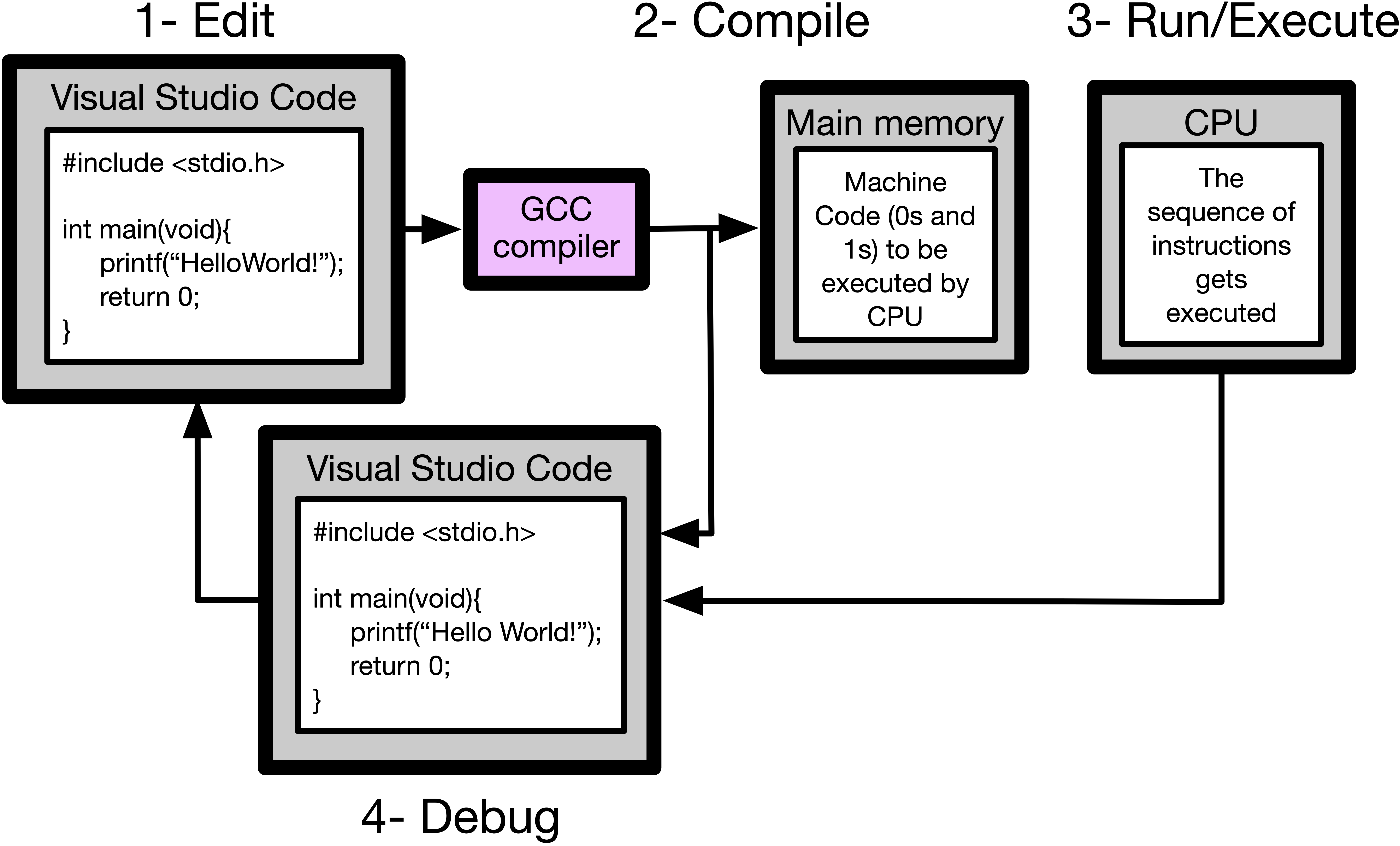
Supposed typical development cycle.
Possible errors in the Dev cycle
Compile-time errors are errors that occur while compiling.
- Errors in syntax or logic, e.g. assigning a variable before it is declared.
- Usually stuff you see in the IDE.
Run-time errors are errors that occur, that you wouldn't see in the IDE. - E.g. logic errors.
1.4 Writing Simple C Programs
Note that a ; is required at the end of each line to signal, as C uses it to determine when a new line is made, rather than indentation.
Lecture 2 interjection
C uses "Types" to describe values. These describe:
- What they represent.
- How much memory they use.
e.g.intrepresents integer, and uses 4 bytes of memory for both positive and negative integers.
- This can represent
different integers. - In C,
intrepresents all integers fromto . - Note that 1 is subtracted from the positive end because one of those values is taken up by the integer 0.
- Each time you multiply an integer by 2, it shifts the cell that is occupied in memory left, and so when you've multiplied to
, it shifts to the negative sign.
The most significant bit is the bit that is at the very left end. In C, it represents the sign of the number, so 0 is unsigned. It is also called a sign bit.
- In C,
Hello world program
Obligatory for any introductory course.
// This program prints the message "Hello World!" on the screen.
#include <stdio.h>

int main(void){
   printf("Hello World!\n"); // Lines like these are called "statements"
   return 0;
}
#include <stdio.h>
Provides the program access to functions that interface with I/O, such as printf and scanf.
//
Commenting a line.
int main(void)
Required for all C programs; called when the program is executed and returns integer value. 0 value indicates program executed successfully, and other values indicate that the program failed.
int indicates that an integer is returned by the function, which in the case of main(), returns 0 if the program executes successfully (just by convention).
void indicates that the function does not accept any parameters.
printf()
Prints function to terminal. Just like in Python, " " are included around the text.
\n is included but is not necessary, as it just creates a new line.
return 0
Makes the function return a 0 integer if it runs successfully.
Note that this does not end the execution of the program, but it is standard practice to put it at the end of a program.
;
Every line ends with a semicolon, which tells C when the line is ending.
Prompt user for input
Prompts user to input the number of pizzas they have, then outputs the total number of slices they have, assuming each pizza has 8 slices.
#include <stdio.h>
int main(void){
  int numPizzas, numSlices;
  printf("How many pizzas do you have?\n");
  scanf("%d", &numPizzas);
  numSlices = numPizzas * 8;
  printf("You have %d slices in %d pizza.\n", numSlices, numPizzas);
  return 0;
}
int numPizzas, numSlices
Declares two integer variables, assigning them to addresses numPizzas and numSlices in memory.
scanf("%d", &numPizzas)
Take user input and assign it to numPizzas variable. Analogous to xyz = input("") in Python.
%d is a format identifier that indicates that user input should be an integer.
& is the address-of operator, which indicates the address in memory of the variable that is being assigned (in this case, numPizzas).
& is a binary operator, which takes in a single value (the starting address in memory)
printf("... %d ... %d ...", numSlices, numPizzas)
Print formatting, where %d is replaced with the value for numSlices and numPizzas respectively.
Lecture 2 interjection
int name;
// Syntax of assignment statement
name = value;
Note that assignment of a variable requires that the data type remains the same, so if name is an integer initially, value must be an integer as well.
Assignment as a part of variable declaration:
int name = 32;
The value of name is what we call an initial value, and this step is called initialization.
C uses char to represent characters.
- Includes letters, digits, punctuation, whitespace, and control characters.
- Takes up only a single byte in memory since there really aren't that many characters possible (in the English language)
- All lowercase, all uppercase, plus some other miscellaneous symbols.
char c = 'A'; // must be a single character, not a whole string.

// Non-printable characters
char tab = '\t';
char newLine = '\n';
char backSlash = '\\';
char singleQuote = '\'';
We can also interpret char as a whole number, using ASCII.
double represents a number with decimal point.
Similar to float, but float is 4 bytes, whereas double is 8 bytes, so double as precise. Very creative.
double pi - 3.14159265358979323846264338
bool is a Boolean, and can either be true or false.
#include <stdbool.h>
// must include this part to use booleans
bool isSnowing = true
int, double, bool, and char are Primitive types, which are the only ones we'll be using in this course.
Note that you can declare a bool, and set it to only equal True if certain conditions are met, in a single line. You can do this by doing:
bool booleanName = <conditions>;
bool takes up 1 byte in memory, as it is simply binary.
bool is simply binary, why does it take up a whole byte?Technically a byte could store 8 boolean values, but then each value would be difficult to address by the CPU, since each byte has a single address. So, C "wastes" that extra space to decrease the complexity of addressing the location in memory, or something like that.
Escape Sequences
An escape sequence is a set of characters that don't represent themselves in printf() or another function that deals with a string.
For example, printf("\n") does not print "\n", but rather a new line instead.
To deal with these, we put an escape character before the escape sequence. An escape sequence is typically a \, e.g. \\n represents the string "\n".
| Escape Sequence w/ Escape Character | Prints |
|---|---|
\\n |
\n |
\\ |
\ |
\\t |
\t |
\' |
' |
\" |
" |
| `\n", grade); | |
| return 0; | |
| } |
The above code prints the integer `grade` as a percentage.
In `printf("... %d` afterwards is an escape sequence with an escape character.

## Lecture 3 Interjection

Format strings:
```c
%d // format specifier for int
%lf // format specifier for a double (stands for long float)
%c // format specifier for a char
%ld // format specifier for a "long int", which is the data type returned by sizeof()
e.g.
#include <stdio.h>

int main(void){
  int grade = 91;
  printf("\nGrade: %d%%\n", grade);
  // prints "Grade: %91"
  printf("\nGrade: %c%%\n", grade);
  // prints "Grade: %[" because it's taking the ASCII of 91.
  printf("\nGrade: %%\n", grade);
  // prints "Grade: %" because there is no format specifier.
  // should error actually, but my C code runs regardless because of some weird setup with my compiler
  return 0;

}
Outputting multiple variables:
#include <stdio.h>
int main(void) {
	int x = 3;
	char y = 'D';
	printf("\nPoint %d%c)\n", x, y);
}
Inputting variables into program
#include <stdio.h>
int main(void) {
	printf("\nInput x: ");
	int x;
	scanf("%d", &x);
	// scans for integer input from user and assigns it to integer at memory address x.
	printf("Output x: %d\n", x);
	return 0;
}
Note that we don't take input through main(), even though we take some input through scanf, since scanf takes user input from terminal, whereas main() takes in some kind of argument.
Creating variables that never change (like in JS)
int main(void) {
	const int Unchanged = 1;
	// x can now never be reassigned, but takes up less memory.
	// for stylistic purposes, const variables should start with uppercase.
	return 0;
}
Program to convert inches to cm
#include <stdio.h>
int main(void) {
	double inches;
	printf("\nInput inches: ");
	scanf("%lf", &inches);
	double cm = inches * 2.54;
	printf("In cm: %lf", cm);
	return 0;
}
Improved version:
#include <stdio.h>
#include <stdlib.h>
int main(void) {
	double inches;
	printf("\nInput inches: ");
	const double inchesPerCM = 2.54;
	scanf("%lf", &inches);
	double cm = inches * inchesPerCM;
	printf("In cm: %.3lf", cm);
	// the '.3' after the "%" specifies the number of decimal places printed out
	// doesn't change the number of decimal places the variable itself has

	return EXIT_SUCCESS; // provided by <stdlib.h>
}