APS105 L12 - Pointers
#APS105 Slides Lecture Link to web notes
Assuming we have a 64 bit binary number, we can represent the whole numbers using a series of binary numbers. E.g. 00000...101 as a whole number is 5.
Hexadecimal (16 values) instead of binary (2 values)
Writing decimal numbers (the ones we read as humans) as hexadecimal is more convenient than using binary, since it allows us to represent a value with fewer characters. Well, it's not really more convenient, but for memory address representation it is.
Hexadecimal is a system that uses 0-9, as well as 6 other characters, to represent data.
- Binary uses 0-1, decimal uses 0-9.
- Instead of "10" to "15", hexadecimal uses a to f.
- Therefore, each hex digit represents 4 bits
- Similarly, two hex digits represents 1 byte.
In C, a hex value starts with 0x
e.g. 0x12f3af (This is not important information for tests)
Translating between hexadecimal and decimal
The conversion table between decimal values (0-15 inclusive) to hexadecimal would be as follows:
| 0 | 1 | ... | 9 | 10 | 11 | 12 | 13 | 14 | 15 |
|---|---|---|---|---|---|---|---|---|---|
| 0 | 1 | ... | 9 | a | b | c | d | e | f |
Thus, the decimal number 3844, represented in hexadecimal, would be as follows:
| 1615 | 1614 | 1613 | 1612 | ... | 162 | 161 | 160 |
|---|---|---|---|---|---|---|---|
| 0 | 0 | 0 | 0 | ... | f | 0 | 4 |
The conversion from hexadecimal to decimal for this number would be as follows:
Storing Data in Memory in C
Recall from L01 that memory is stored in byte-sized cells, where each cell is assigned an address.
- These memory addresses are stored in Hex.
- For some data that uses more than a single byte, C will store it in multiple cells in memory.
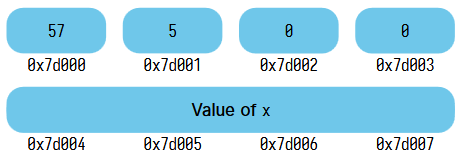
In the above image, the value of int x is stored across four different cells, which each store a single byte.
Pointers in C
A pointer is the starting address of a value in memory.
- Thus, for some data that takes up multiple bytes, the pointer would be the lowest address in which the data is stored.
- In the previously-shown image, the pointer value would be
0x7d004.
The result of calling this is the pointer of the data stored at that address in memory.
e.g. &x -> 0x7d004
The data type of a pointer for an int value is an int*, not int. This means that it is "pointing to" an an integer value (i.e., the address).
Example: Creating a valid pointer
int x = 1;

int z = &x; // invalid because &x is a pointer, not an int
int *z = &x; // valid because now z is specified to be a pointer
Example: Changing the value stored at a specific address, using a pointer.
#include <stdio.h>
int main(void) {
	int x = 1;
	int y = 2;
	int *z = &x; // creates a pointer equal to address of x
	*z = 3; // reassigns the value at the address that the pointer is referencing to 3
	printf("%d\n", x); // x now returns value of 3
	printf("%p\n", z); // returns the memory address that z points to

	z = &y; // setting the pointer equal to another memory address (that of y)
	printf("%p\n", z); // returns the new memory address that z points to
	return 0;
}
e.g. y = *pointer is known as dereferencing, and printing y results in the value stored at the address that pointer points to.
Whenever we declare a variable with a *, that is a pointer. This means that each time we set a value for the pointer using *z = 105, we are changing the value stored at the address that the pointer is pointing to, rather than the address that the address is pointing to.
- If you wish to change the address that the pointer is pointing to, simply set the pointer, without the
*, equal to another address. - e.g.
z = &yand NOT*z = &y - In essence:
int *pointer = &addresssets a pointer equal to an address in memory, and thus the variable*pointerredirects any logic involving it to the value stored at the address that it points to, which in this case, is at&address.*pointer = <value>sets the thing stored at that position in memory equal to<value>.pointer = &newAddresschanges the address that the pointer points to.- If we do
*pointer = <newValue>again, then<newValue>will now be stored at&newAddress, and not&address.
- If we do
For variables outside of the scope of the function, the function can still change their values if they do it through pointers. This is because the pointer is referencing an address in memory, rather than an arbitrary variable name—which is localized based on function scope.
Example: Changing the value of a variable using a function, out of scope
#include <stdio.h>
void setThree(int *p) {
	*p = 3;
}

int main(void) {
	int x = 1;
	int *z = &x; // setting a pointer variable equal to address of x
	setThree(z); // changing the value at address of x to 3, even out of scope
	printf("Address: %p\n", (void *) z); // prints the address of z using %p
	printf("%d", x);
	return 0;
}
Understanding the Asterisk * Operator in C
Each use of * when working with a pointer removes a * from the data type.
#include <stdio.h>
int main(void) {
	int x = 1;
	int *pointer = &x;
	int y = *pointer // removes an instance of * from the pointer
	// thus resulting in the value stored at the address (i.e., 1)

	int **newPointer;
	// typeof(newPointer) would be int **
	// typeof(*newPointer) would be int *
	// typeof(**newPointer) would be int
}
Format Specifier of a Pointer
We can also print the address of a pointer by using the format specifier %p.
- Expects a type
void *, meaning that it's a generic pointer; C does not care about the type value at this address. - So, we can cast a pointer of any type to a
void *
Example: swap(&a, &b) function swaps the values at addresses of a and b.
#include <stdio.h>
#include <stdlib.h>
void swap(int* a, int* b) {
	int temp = *a;
	*a = *b;
	*b = temp;
}

int main(void) {
	int a = 1;
	int b = 2;
	printf("main (before swap) a: %d, b: %d\n", a, b);
	swap(&a, &b);
	printf("main (after swap) a: %d, b: %d\n", a, b);
	return EXIT_SUCCESS;
}