L04 - L05 Reference Review and Multiple File Programs
example: references review
#include <iostream>
using namespace std;

int main(void) {
	int a = 7;
	int& ra = a;
	int b = 12;
	ra = b; // value of a gets changed to b (12)
	// still referring to a, but value of a is same as b now

	int x = 10;
	int& y = x;
	y = 20;
	cout <<x << " " << y << endl;
	return 0;
}
reference vs pointer
- pointer is a variable and has memory allocated to it, whereas a reference is just an alias.
- pointer can be reassigned to the address of another variable, but reference cannot be reassigned.
- pointer can be uninitialized or set to
NULL, but a reference must be initialized to a variable.
int main(void) {
	int x = 10;
	int* px = 20;

}
multi-file programs
so far, we have been programming multiple functions within a single file. when we do this, the .cpp code has to be translated to machine code (i.e., compiling using g++).
g++ to compile a main.cpp file
g++ main.cpp -o main compiles main.cpp into machine code and stores it into a .out file.
However, this poses problems:
- Whenever you want to change a single line, you have to recompile the entire program
- The code is harder to collaborate with; harder to divide tasks between team members
So, we can divide a program into multiple files to:
- Make the code compile faster
- Make collaboration easier (through compartmentalization - not an actual coding word, I just remember it from biology)
- If there's an error in a separate file, it's easier to find it and debug
example: splitting code into multiple files
Note: we need to divide the function headers into header files.
// print.h
void printNum(int\n) {}
// print.cpp
#include "print.h"
void printNum(int n) {
	cout << "The number is " << x << endl;
}
// input.h
int userInputNum();
// input.cpp
#include "input.h"
int userInputNum() {
	int x;
	cout << "Enter a number: " << endl;
	cin >> x;
	return x;
}
// main.cpp
#include "print.h"
#include "input.h"

int main(void) {
	int num = userInputNum();
	printNum(num);
	return 0;
}
g++ main.cpp print.cpp input.cpp -o main to compile to .out files
Then, g++ print.o input.o main.o -o main compiles the .out files to a single executable. i.e. [[#linking stage]]
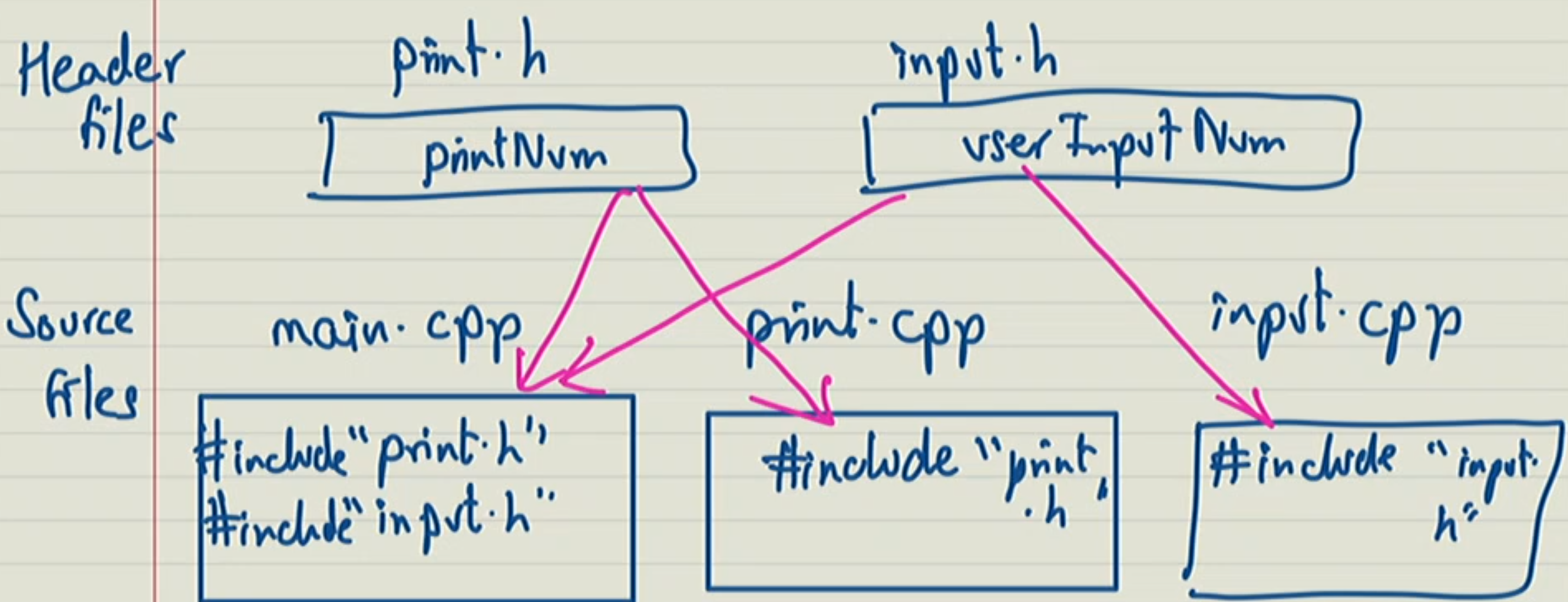
preprocessing
goes into each and every .cpp file; if there exists any #include __.h, it removes that line and pastes the contents of the .h files into the .cpp files themselves, so that we have the function declarations before we run them in the .cpp file - so that it's not running a function that has not yet been declared.
Then, compiler (g++ -c main.cpp -> -c flag tells compiler to only compile a single file)
linking stage
taking all the individually-compiled .o files and combining them into a single executable.
#include source files not header files?
main.cppwould then have the implementation of any included functions (e.g.userInputNumandprintNum), making the compilation ofmain.cpptake a much longer time- If there was an error in any of the included functions, it would fail at the compilation stage of
main.cpp, making it harder to debug. - Linking will fail as the function implementations exist in different files; the linking command links multiple separate
.ofiles, assuming functions are only implemented in their respective.ofiles.
The functions are essentially being defined/compiled again if source files are in#includeand not header files.
What happens if we include the same header file multiple times into the same source file?
Example:
// a.h
struct A{
	int ID;
}
// b.h
#include "a.h"
void func(struct A); // need to #include the header file first before referencing it
// b.cpp
void func(struct A) {
	// stuff
}
// c.h
#include "a.h"
void func2(struct A);
// c.cpp
void func2(struct A) {
	 // stuff
}
// main.cpp
#include "a.h"
#include "b.h"
#include "c.h"
int main() {
	struct A ...
	func();
	func2();
}
struct A because each header file included #include "a.h".solution
header guards guard a header file from multiple inclusions in the source file
// a.h
#ifndef A_H_
#define A
struct A {
	int ID;
};
#endif // defining the struct if it hasn't already been defined before?